rigorkit
From the repositoryREADME.md ↗
rigorkit
Section titled “rigorkit”A factory for rigorous, tool-neutral work: common departments, specialized processes and human approval gates. The software lane is available today. Supports Claude Code, Codex, Cursor and OpenCode. Install only the packs you need.
From a feature to an accepted slice
Section titled “From a feature to an accepted slice”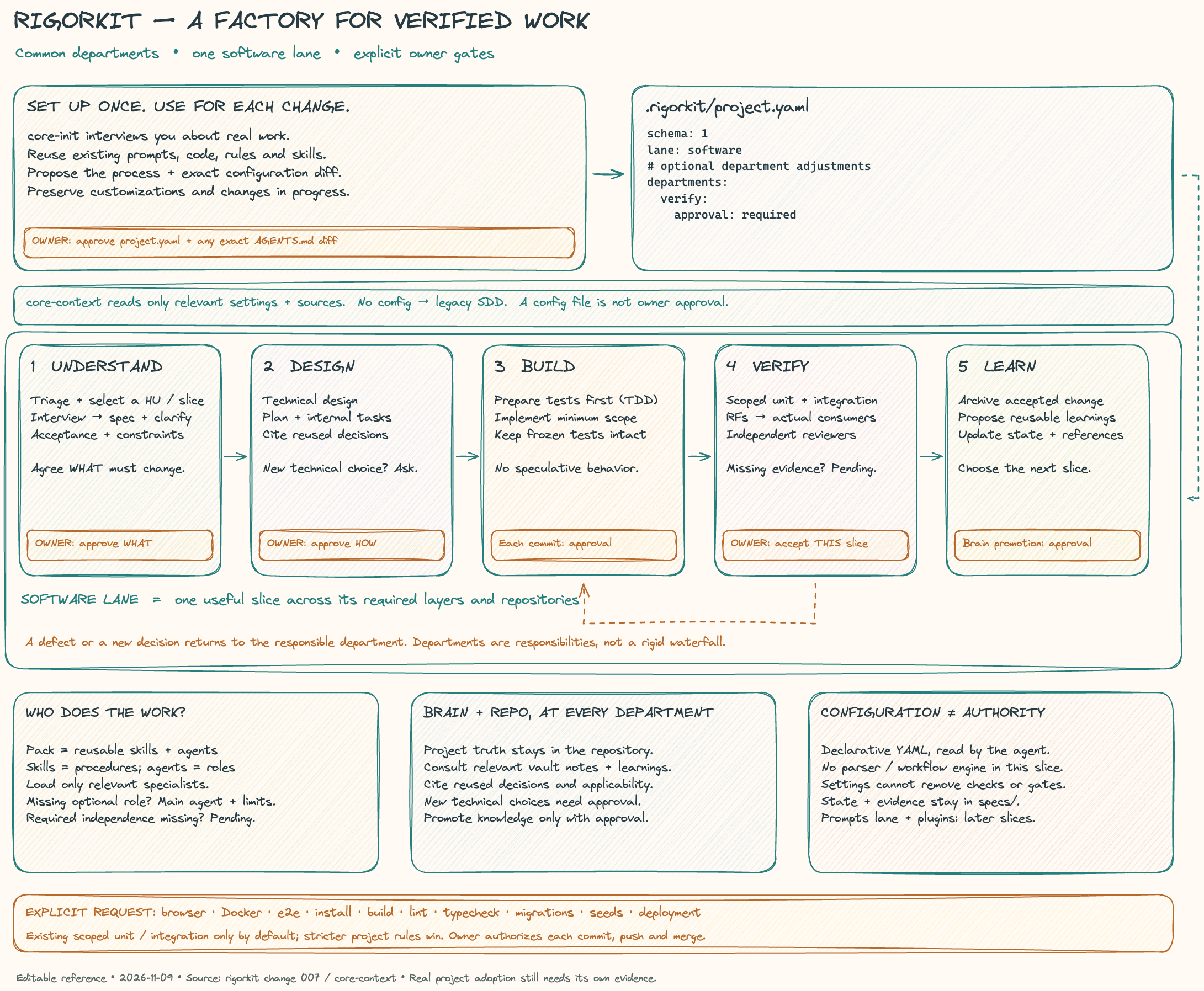
The factory coordinates the work; Spec-Driven Development (SDD) remains the method inside each slice. A slice is the smallest useful behavior that works across its required layers and repositories. A user story or ticket describes that slice; technical tasks are its internal checklist, not separate deliveries.
| Station | Output and handoff |
|---|---|
| 1. Slice the feature | Propose a flat roadmap of useful outcomes and dependencies. You choose the next slice. |
| 2. Specify and clarify | Agree on behavior, acceptance, scenarios, invariants and exclusions. You approve WHAT. |
| 3. Design and plan | Propose the minimum solution and its tasks. You approve new technical decisions and HOW. |
| 4. Prepare tests | Turn acceptance into checks that can distinguish the requested behavior from a plausible wrong implementation. |
| 5. Build | Implement the approved slice, run permitted tests and return evidence. No speculative behavior. |
| 6. Review and accept | Check spec compliance separately from architecture and applicable specialist concerns. You accept this slice. |
| 7. Close and learn | Record completion, update repository knowledge and propose reusable learnings. You choose what comes next. |
Each handoff carries the approved scope, relevant decisions and sources, affected consumers, evidence and unresolved items. A station cannot treat the previous agent’s claim as proof. Implementation defects return to construction; ambiguous behavior returns to you. Acceptance never silently starts another slice or authorizes a commit, push or merge.
The brain accompanies every station
Section titled “The brain accompanies every station”The adopting repository is the source of truth. When configured, the vault is the shared brain for reusable decisions and knowledge, available whenever a station needs it. Search by topic, read the relevant notes and reuse unchanged evidence; do not load the whole vault at every step. Before applying an existing decision, report the decision and its source. Ask about conflicts or uncertain applicability; every new technical decision requires your approval.
Repository-specific findings stay in that repository. Generic team learnings live in specs/learnings/; cross-project knowledge is proposed for the vault and promoted only with approval. Later slices consult those lessons instead of starting from scratch.
Small means useful, not incomplete
Section titled “Small means useful, not incomplete”For instance-level form options, a useful first slice is: configure the clear button on a widget instance, preserve it through the existing data path, render that choice, and prove that two instances of the same form can differ. A CMS section can be a separate slice when it is independently usable. “Add a backend field” alone is a task, not a user outcome.
{
  "widgetA": { "formId": "contact", "showClearButton": true },
  "widgetB": { "formId": "contact", "showClearButton": false }
}
Keep only the behavior and constraints agreed for this slice. Missing information becomes a question, not a guessed default, future option or new abstraction. See the worked example and Jest checks.
Execution boundary
Section titled “Execution boundary”Agents may run existing, scoped unit and integration tests with Jest or equivalent tools. Browser sessions, Docker and end-to-end tests require an explicit request. Installation, build, lint, typecheck, migrations, seeds and deployment are not authorized by this testing permission. If a test requires unavailable services or restricted infrastructure, report it as pending; do not start the infrastructure. Stricter adopting-project rules still apply.
Local skills/agents now carry this contract; setup includes frozen-test and lexical branch-trace checks. See the execution and evidence details and agency-agents adaptations. Per-project adoption and actual model instruction-following need their own evidence. Existing installed copies require reinstall; both base reviewers remain enabled.
Departments, lanes and packs
Section titled “Departments, lanes and packs”A department is a common responsibility. A lane adapts those responsibilities to a work type. A pack distributes reusable skills and agents under <pack>-<role> names; it is neither a department nor an execution instance.
| Department | Software work |
|---|---|
| Understand | Triage, select a useful slice, context, spec and clarification; approve WHAT |
| Design | Technical choices, plan and tasks; approve HOW |
| Build | Prepare discriminating tests and implement the agreed slice |
| Verify | Checks, regression/integration and independent reviewers; owner accepts this slice |
| Learn | Archive and approved learning capture/promotion |
These are responsibilities, not a rigid waterfall. TDD prepares tests before code; verification can return work to an earlier department. Earlier slice/triage/test-commit gates remain. Software is the only implemented lane; prompt processes, distributable plugins and a workflow engine are deferred. design, security, architecture and frontend remain specialists with their existing names and mandatory triggers.
Initialize or adopt a project
Section titled “Initialize or adopt a project”Install core,sdd or all, then ask your agent to run core-init. It interviews you about outcomes, existing work, constraints and evidence, then proposes the department mapping and exact configuration/instructions diff for approval. Existing work and custom rules are preserved. An unfamiliar domain gets questions and a draft, not invented expertise or a runnable process.
The minimal project-owned .rigorkit/project.yaml is:
schema: 1
lane: software
Optional department adjustments belong in that same file and ADD to existing responsibilities; they never remove required tests/reviewers/approvals. See core-context for the schema, named-capability references and limits. For example, if team-contract-evaluation really exists and applies:
schema: 1
lane: software
departments:
  verify:
    skills:
      - team-contract-evaluation
Configuration is interpreted by the agent, not enforced by a new parser or runtime. A file alone is not approval or proof a referenced capability ran. Missing/duplicate capabilities and invalid settings are explicit gaps; required independent review cannot become self-review. Runtime status/spec/plan/evidence stays in specs/, not YAML. Private brain paths stay in unversioned local instructions.
Already using SDD? Existing sdd-init and other SDD names remain valid. Without configuration, keep the legacy flow. With core available, sdd-init can offer core-init in configuration-only mode, which never calls back into SDD setup. You approve the migration diff; Rigorkit does not rewrite ongoing changes, personalizations or installed copies automatically. Without core, SDD still works and reports requested configuration capabilities it cannot apply.
| Pack | Contents |
|---|---|
| core | Project initialization/context skills; global-only token-economy rules and test/error/JSON helpers |
| sdd | Software process: specs, plan/tasks, test/build/review and learnings; templates/checks, three readonly agents and a builder |
| architecture | Layers/hexagonal, plugin registry, architecture review/audit |
| frontend | React/Next.js folders/names/routes/barrels, frontend review/audit |
| design | UX/UI criteria, accessibility, capture checklist and advisory interface review |
| security | Threat modeling, secure defaults and security review |
Install
Section titled “Install”Quick start
Section titled “Quick start”New to rigorkit:
sh -c "$(curl -fsSL https://raw.githubusercontent.com/harrypotter48/rigorkit/main/tools/install-remote.sh)"On a terminal the installer asks one question: whether to also install the global rules of core (no skills) for the tools it finds (~/.claude, $CODEX_HOME or ~/.codex, ~/.config/opencode). Answer n, or set RIGORKIT_NO_RULES=1, to skip it. Open a new shell, then install the packs you need into a repository:
rigorkit install --pack core,sdd --agent claude --project ~/code/my-repoInstall more globally only if you want it (rigorkit install --pack core,sdd --agent claude --global); to add just the rules later: rigorkit install --pack core --agent claude --global --rules-only.
In that repository ask your agent for sdd-init (or sdd-adopt for existing code), then for a feature start with sdd-slice.
Already using rigorkit (any version from 0.3.0): update, register the projects you installed before, update them, and check everything:
rigorkit updaterigorkit scan --save ~/workspacerigorkit updaterigorkit doctorscan lists the projects it found and asks once whether to register them with the suggested tools (e lets you choose per project; --tools claude answers without asking); project updates are never committed, so review them with git in each repository. On 0.2.0, first follow “Update from 0.2.0” below.
Details
Section titled “Details”One line clones the newest release into ~/.rigorkit and enables the rigorkit command and man rigorkit in new zsh and bash shells. It installs no pack. On a terminal it also asks once whether to install only the global rules of core (a rules block with a .rigorkit.bak backup next to each existing file; never skills or agents); only after your yes does it run the clone’s installer, once per tool, after checking that the clone and the instruction files are yours and not writable by others. A tool whose file already has the block is skipped (nothing to do); a block with a start marker but no end marker is reported, left untouched, and the run ends with a failure status; a relative CODEX_HOME is refused. The installer also writes ~/.rigorkit-version and ~/.local/state/rigorkit/global; preview any of it with --dry-run. Without a terminal on input and output (curl … | sh, a redirected output), with RIGORKIT_NO_RULES set to any non-empty value, or with no tool found, it prints the command to run later instead; a release too old to install rules alone says so and points to rigorkit update:
sh -c "$(curl -fsSL https://raw.githubusercontent.com/harrypotter48/rigorkit/main/tools/install-remote.sh)"Then open a new shell and install packs with rigorkit install (same options as install.sh):
rigorkit help
rigorkit install --pack core,sdd --agent claude --global
Your own packs and scripts go in ~/.rigorkit/custom/packs and ~/.rigorkit/custom/scripts; a custom pack or script replaces the official one with the same name. Helper scripts are no longer copied: global rules call them with rigorkit script <name>. An existing 0.1.0 install keeps working; its old copies in ~/.local/share/rigorkit/scripts are left as they are. If rigorkit runs an older copy, check command -v rigorkit.
Use rigorkit script code-context find <symbol> [path] to locate textual references as one path:line[,line...] row per file. It uses an available rg and defaults to the current directory. See helper examples.
Terminal colors
Section titled “Terminal colors”Rigorkit colors its own terminal output: additions and successes green, removals and errors red, questions and warnings yellow, headings cyan. Paths and ordinary text keep the terminal default. Each output channel decides independently; pipes and files stay plain. A non-empty NO_COLOR (including NO_COLOR=1 or NO_COLOR=0) or TERM=dumb disables colors. An empty NO_COLOR does not disable them. Agents using a pseudoterminal must set NO_COLOR=1.
rigorkit script preserves each script’s own bytes and colors, even if that script ignores NO_COLOR. Typed answers use the terminal default. Shell-start notices, persisted agent notices and generated/installed content stay unchanged.
Update
Section titled “Update”Once a day, when you open a terminal or run rigorkit, rigorkit checks in the background for a newer release. In prompt mode (the default) the next terminal asks whether to update; reminder prints one line instead and disabled turns the check off (update_mode and update_days in ~/.config/rigorkit/config). Agents that use an entry skill mention a new version once per session.
rigorkit update --dry-run
rigorkit update
rigorkit update moves ~/.rigorkit to the newest release, prints the changelog of every version in between, and then asks before it rewrites your startup block, global rules, global skills and agents (edited copies one by one, with the diff), installs new packs or removes old scripts. A global install made before 0.3.0 has no record: run rigorkit install --global --pack <packs> --agent <agents> once (without --force) so updates can manage it.
Find and register your projects
Section titled “Find and register your projects”Every rigorkit install --project <dir> registers that project in ~/.local/state/rigorkit/projects; projects installed before 0.6.0 are found with rigorkit scan.
rigorkit scan finds the projects where rigorkit is installed (folders holding .rigorkit-version, up to 4 levels deep) and registers each new one, so rigorkit update can update them later. It asks which tools each project serves and marks copies you edited since 0.1.0, so updates ask before replacing them. Set the folders once in ~/.config/rigorkit/config, or save them with --save:
scan_paths=~/workspace
scan_exclude=archive,dist
rigorkit scan --save ~/workspace.git, node_modules and the names in scan_exclude (folder name patterns) are never entered; --tools claude,codex answers the tools question for every project (for scripts); --dry-run shows what would be registered and writes nothing.
Then rigorkit update also asks, per outdated project, whether to update it: unedited copies are replaced, edited ones are asked overwrite or keep with the diff, projects installed from another clone get their own question, records of deleted folders can be removed and an old specs/backlog.md can be renamed to specs/roadmap.md. Nothing is committed or staged; review the changes with git.
rigorkit doctor reports the clone version and local changes, custom items that shadow official ones, edited or missing global copies, packs recorded but no longer shipped, and every registered project’s version (outdated or not), development clone, edited copies and missing folders. It only repairs the execute bit of official scripts and exits 1 when something needs attention.
Update from 0.2.0
Section titled “Update from 0.2.0”0.2.0 has no rigorkit update. Move the clone to 0.3.0 once by hand; if git refuses because you edited a file in ~/.rigorkit, move that edit to the custom area (~/.rigorkit/custom) first:
git -C ~/.rigorkit fetch --tags origingit -C ~/.rigorkit checkout v0.3.0Then open a new shell and run rigorkit update to refresh the startup block.
From any clone, install.sh stays available:
git clone <repository-url> rigorkit
cd rigorkit
./install.sh --version
./install.sh --list
./install.sh --pack sdd --agent claude,cursor --project ~/code/my-repo
./install.sh --pack sdd --agent claude,codex,cursor,opencode --global
./install.sh --pack all --agent claude,cursor --project ~/code/my-repo --force
./install.sh --pack core --agent claude,codex,opencode --global --dry-run| Option | Meaning |
|---|---|
| –pack sdd[,other] | Select packs; all cannot be combined with names |
| –agent claude,codex,cursor,opencode | Target tools |
| –project DIR | Install into repository; default current directory |
| –global | User-wide installation |
| –force | Overwrite existing installed files |
| –dry-run | Show planned actions, rule diff; no writes |
| –version | Print the local version |
| –uninstall-rules | Remove only rigorkit global rule blocks |
Releases: bump VERSION in a pull request; after the merge, CI runs the toolkit tests and publishes the tag v<VERSION> (.github/workflows/release-tag.yml), which the one-line installer downloads.
A clone you manage yourself (not ~/.rigorkit) updates with git pull and ./install.sh ... --force; --pack all --force replaces installed packs and adds new ones. rigorkit update manages only ~/.rigorkit.
The version lives in VERSION at the repository root and is the only copy of it. The installer records the version it wrote in .rigorkit-version at the scope root (the project directory, or your home directory for a global install), and --list prints the local version next to the installed one. Without --force the installer never overwrites an installed copy, so a different installed version is reported instead of replaced.
Destinations
Section titled “Destinations”| Tool | Skills | Agents |
|---|---|---|
| Claude Code | .claude/skills/ | .claude/agents/*.md |
| Codex | .agents/skills/ | .codex/agents/*.toml |
| Cursor | .agents/skills/ | .cursor/agents/*.md; reads .claude/agents/ if Claude also selected |
| OpenCode | .agents/skills/ | .opencode/agents/*.md; global ~/.config/opencode/agents/ |
| Global paths start at ~. Skills are copied, not symlinked (unreliable in Cursor/Codex); .rigorkit records origin and .rigorkit-version records the installed version. Cursor/OpenCode may see duplicate skills when .claude/skills and .agents/skills coexist. | ||
| Global core rules use markers in ~/.claude/CLAUDE.md, ~/.codex/AGENTS.md and ~/.config/opencode/AGENTS.md, preserving outside content; see core. |
Optional model tiers
Section titled “Optional model tiers”Agents declare cheap/strong, never a fixed model. Configure per tool in ~/.config/rigorkit/models and reinstall –force:
claude.cheap=haiku
claude.strong=opus
opencode.cheap=<provider/model>
Legacy barato/fuerte tiers and keys still work; English keys take precedence, even when empty (inherit session). Missing file/tool mapping also inherits session; one-model/free-model setups need none. Override path with RIGORKIT_MODELS.
SDD and its specialists
Section titled “SDD and its specialists”Install sdd, then ask for sdd-init. For existing code, continue with sdd-adopt. sdd staffs the software lane; design and security are specialists in that lane, not lanes of their own, and join the SDD review station when the change needs them.
Change flow (the entry stage is being added in the Factory v2 work):
sdd-slice→ owner-selected roadmap entry →sdd-triage/sdd-contextsdd-spec→sdd-clarifyautomatically; user approves the clarified specsdd-plan→sdd-tasksautomatically; user approves HOW and the functional blockssdd-testsfor the selected slice/block; run permitted tests and record intended-red evidencesdd-implement(the approved slice/block; internal tasks, minimum implementation, scoped unit/integration tests)sdd-verify(spec/architecture/integration evidence; requested live checks, otherwise pending)sdd-archive
For a normal single-repo story approved with Artifacts: spec+tasks, Understand records the behavior in spec.md, Design records HOW and one B1 in tasks.md, and Verify reviews one combined diff and records its evidence in tasks.md. rigorkit script spec-status reads the final validation there. Architecture, data-model, critical and larger changes retain their applicable artifacts and reviews.
After the builder, the enabled reviewers run together, each with the same references and no other reviewer’s report. sdd-approver aggregates their verdicts into approved, needs human or failed, and you close the change. Interface improvements never block; an interface defect blocks only when the same change does not correct it.
You approve WHAT after the spec has been clarified, then HOW after the design and block tasks are ready. Unresolved decisions come back to you before proceeding. Internal tasks are a checklist: implementation and review cover the approved functional block, with scoped unit/integration checks and explicit approval for every commit. Tests outside that boundary remain on request; every slice is accepted separately.
Reuse verified context while its source is unchanged; read referenced sections and expand when evidence is missing, dependencies change or risk grows. Whole-change integration and critical-path checks remain required; required live verification stays pending until explicitly requested and evidenced. See functional blocks, review stations and selective context.
Process skills have roles/stops; paired SDD stages share their approval gate. Reference skills (architecture-boundaries, frontend-structure, design-ux-flow, design-ui-criteria, security-baselines) supply knowledge and follow their caller’s stop. Readonly reviewers inspect diffs or audit folder debt. Cross-pack dependencies are soft, by name: absent packs are reported and SDD performs relevant checks itself. Implementation/verification uses the architecture reviewer and the frontend reviewer for .tsx/.jsx/app/ changes, plus the security reviewer for sensitive paths and the interface reviewer for rendered screens.
Ask for “audita la arquitectura de src/” or “audita la estructura del front”. Contribution rules: AGENTS.md.
Website
Section titled “Website”The intended GitHub Pages address is harrypotter48.github.io/rigorkit. Publication requires enabling Pages and a successful primary-branch workflow; configuration alone does not mean the site is live. The website regenerates documentation, pack summaries and search from this README and pack Markdown during CI builds. A push to main publishes the checked result through GitHub Actions when Pages is configured; feature branches and PRs only run checks. Internal specs are excluded from its pages/search. See website maintenance for local setup, checks and publishing prerequisites.
License
Section titled “License”MIT: LICENSE. Some SDD templates derive from hello-sdd, Apache-2.0; see NOTICE.